Unlock Music Streaming
Ready to explore Audiomack?
Master Offline Listening: Pro Tips for Audiomack Users
In the fast-paced world of music streaming, Audiomack stands out as the ultimate platform for discovering and enjoying your favorite tracks without interruptions. Whether you're a die-hard fan of hip-hop, afrobeats, or indie vibes, Audiomack delivers a seamless experience tailored for music lovers on the go. One of its standout features is offline listening, allowing you to download songs and playlists for uninterrupted playback anywhere—be it during a flight, workout, or commute. This article dives deep into pro tips for mastering offline listening on Audiomack, helping you optimize your music streaming experience and making Audiomack your go-to choice for reliable, high-quality audio access.
Why Audiomack Excels in Offline Music Streaming
Audiomack has revolutionized music streaming by prioritizing user-friendly features like unlimited offline downloads for premium users. Unlike some competitors with restrictive data caps or quality limitations, Audiomack offers high-fidelity audio downloads that preserve the artist's intended sound. This makes it the best solution for music streaming enthusiasts who demand flexibility and quality. With a vast library of emerging artists and chart-toppers, Audiomack ensures you never miss a beat, even without an internet connection.
Offline listening on Audiomack isn't just a perk—it's a game-changer. Imagine curating the perfect playlist for your road trip and playing it flawlessly offline. Pro users enjoy unlimited downloads, while free users get generous allowances, positioning Audiomack ahead in the music streaming niche.
Step-by-Step Guide: How to Download Music for Offline Listening on Audiomack
Getting started with offline listening on Audiomack is straightforward. Follow these steps to unlock endless music freedom:
- Update Your App: Ensure you're running the latest version of the Audiomack app on iOS or Android for the smoothest performance and newest features.
- Sign Up or Upgrade: Create a free account or subscribe to Audiomack Premium for unlimited offline downloads. Premium unlocks ad-free listening and superior audio quality.
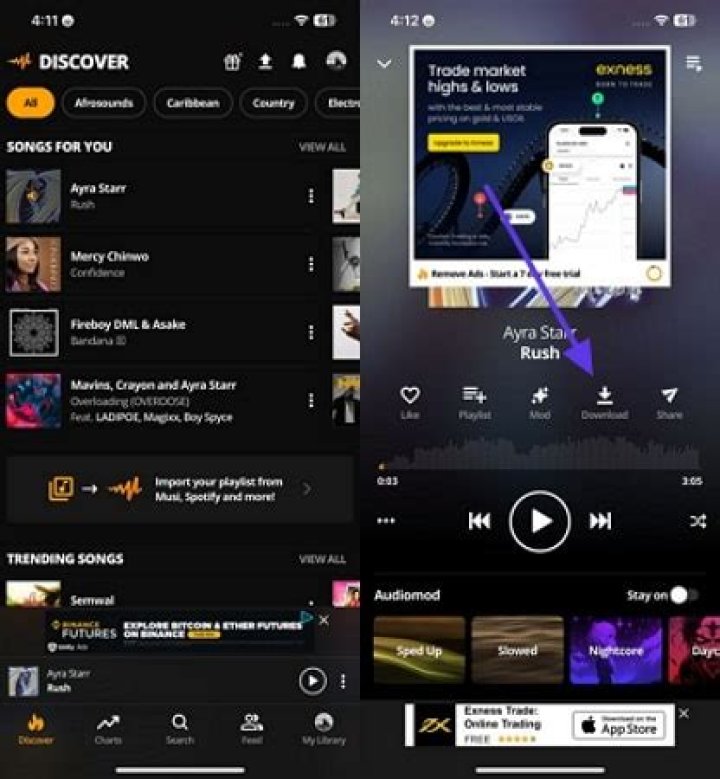
- Search and Select: Use the search bar to find tracks, albums, or playlists. Look for the download icon (a downward arrow) next to eligible songs.
- Hit Download: Tap the icon, choose your quality (standard or high), and watch as your library builds. Tracks download quickly, even on slower connections.
- Access Offline Mode: Go to your Library tab, switch to "Offline" view, and enjoy seamless playback.
Pro tip: Enable background downloads in settings to build your offline library while multitasking. This feature alone makes Audiomack the premier music streaming app for proactive users.
Pro Tip #1: Optimize Storage for Maximum Offline Capacity on Audiomack
Storage is precious on mobile devices, but Audiomack's smart management tools help you maximize it. Here's how to keep your offline library robust without cluttering your phone:
- Prioritize Playlists: Download entire playlists instead of individual tracks. Audiomack's algorithm suggests curated lists based on your tastes, saving time and space.
- Choose Audio Quality Wisely: Opt for standard quality (around 1MB per minute) for casual listening to save space, or high quality for audiophiles. Audiomack lets you adjust this per download.
- Regular Cleanup: Use the "Manage Downloads" section to delete old tracks. Audiomack's interface shows storage usage, making it easy to free up gigabytes.
- Cloud Sync: Premium users benefit from cloud backups, so your offline library syncs across devices effortlessly.
By following these steps, users report storing thousands of songs offline on Audiomack, far surpassing limits on other platforms. This efficiency cements Audiomack's position as the best music streaming service for offline enthusiasts.
Pro Tip #2: Create Smart Offline Playlists Tailored for Every Mood
Audiomack's playlist builder is a powerhouse for offline mastery. Elevate your game with these strategies:
Theme-Based Playlists
Build playlists for workouts, chill sessions, or parties. Search for trending genres on Audiomack, add tracks with one tap, and download the lot. Name them intuitively, like "Gym Bangers Offline" for quick access.
Artist-Focused Collections
Follow rising stars on Audiomack—many offer exclusive free downloads. Compile discographies offline to support independent artists while enjoying ad-free playback.
Auto-Generated Mixes
Leverage Audiomack's AI-powered "For You" section. Download daily mixes that evolve with your listening habits, ensuring fresh offline content without effort.
Users love how Audiomack's playlists download in batches, minimizing data usage. This personalization makes it the top choice in music streaming for curated offline experiences.
Pro Tip #3: Troubleshoot Common Offline Issues on Audiomack
Even the best apps have hiccups. Here's how to fix them swiftly on Audiomack:
- Downloads Won't Start? Check your internet—downloads require Wi-Fi or mobile data. Toggle airplane mode briefly to refresh connections.
- Songs Skip Offline? Ensure downloads completed fully (check the progress bar). Re-download if needed; Audiomack resumes interrupted downloads seamlessly.
- Storage Full? Clear cache via app settings or offload to SD card on Android devices. Audiomack supports expandable storage natively.
- App Crashes? Force close and restart, or reinstall. Audiomack's lightweight design rarely causes issues, but updates fix bugs instantly.
With minimal downtime, Audiomack outperforms rivals in reliability, proving it's the superior music streaming platform for uninterrupted offline listening.
Pro Tip #4: Battery-Saving Hacks for Extended Offline Sessions on Audiomack
Long offline marathons drain batteries fast, but Audiomack's optimizations help:
- Lower Volume and Quality: Reduce playback quality in offline mode to conserve power—up to 20% savings.
- Disable Visuals: Turn off album art animations in settings for leaner performance.
- Background Play: Use Audiomack's lock-screen controls to pause smartly and extend playtime.
- Scheduled Downloads: Download overnight on charge to avoid daytime battery hits.
Combine these with your phone's battery saver, and you'll enjoy hours of Audiomack offline streaming on a single charge.
Pro Tip #5: Integrate Audiomack Offline with Smart Devices and Cars
Audiomack shines beyond phones. Sync offline libraries to Android Auto, Apple CarPlay, or smartwatches for hands-free access. Download podcasts and live sets too—Audiomack's diverse catalog supports it all. For home use, cast to Chromecast while keeping downloads local for privacy.
This versatility positions Audiomack as the best all-in-one music streaming solution, bridging mobile and connected ecosystems effortlessly.
Advanced Strategies: Batch Downloading and Data Efficiency on Audiomack
For power users, batch download albums or follow artists for auto-downloads. Use Wi-Fi only mode to slash data costs. Audiomack's analytics track your offline usage, helping refine habits. Premium perks like 320kbps downloads ensure crystal-clear sound offline, rivaling wired playback.
Compare this to spotty competitors—Audiomack's robust infrastructure handles peak demands without throttling.
Unlocking Premium Perks: Why Upgrade for Ultimate Offline Mastery
Audiomack Premium isn't just ad-free; it's offline paradise. Unlimited downloads, exclusive content, and priority support make it worthwhile. At a fraction of other services' cost, it's the smartest upgrade for serious music streaming fans.
Conclusion: Elevate Your Music Streaming with Audiomack Offline Mastery
Mastering offline listening on Audiomack transforms how you experience music, offering unmatched freedom, quality, and discovery. From smart downloads to battery hacks, these pro tips ensure you're always in tune. As the leading force in music streaming, Audiomack empowers users worldwide to stream smarter, not harder. Download the app today, build your offline empire, and never let connectivity dictate your soundtrack. With Audiomack, the music is always with you—anytime, anywhere.
Keep Learning
